


Nodes
Reducing friction in how designers find the right inspiration
Project type
Desktop Software,
New product
Role
UX Researcher & Designer
Team
Sole Contributor
The problem area
Designers save inspiration everywhere: Pinterest, Instagram, screenshots, browser bookmarks. Over time it scatters across platforms, and finding a specific save later becomes hard.
So when it's time to design, they search the internet again, either for that exact reference or for something new. The inspiration they already collected sits unused while the pile keeps growing, wasting both the effort spent saving and the time spent searching again.
Introducing Nodes
Nodes is a desktop app that runs alongside the design tool. It reads the frame in progress and surfaces relevant inspiration automatically: no keyword, no folder, no digging back through five apps.

Grammarly, but for inspiration.
It started with my own frustration
I save across Pinterest, LinkedIn, Twitter and browser bookmarks, and I could never find things when I needed something I'd saved. I'd either spend time digging through my saves or end up searching the internet again. It was frustrating enough that I wanted to see if other designers were running into the same thing.
Want to see the final problem statement first?

So I researched why saves get abandoned
Before talking to designers, I looked into why saved inspiration gets abandoned. The answer was a basic usability principle.
Recognition, not recall
Jakob Nielsen's sixth usability heuristic: good interfaces let people recognise what they need on sight, instead of making them recall it from memory.
"Minimise the user's memory load by making visible objects, actions, and options."
— Jakob Nielsen
This is exactly where saving breaks. A designer knows the reference the moment they see it, but finding it again means remembering the keyword, folder, or platform it's under. That's the part memory is worst at. Folders and tags don't fix it, because they still ask the designer to remember where something was put.
Then I checked if other designers felt it too
To understand the problem better, I ran a survey which got 23 responses from designers across experience levels, and then interviewed three of them to dig into the questions the survey left open.

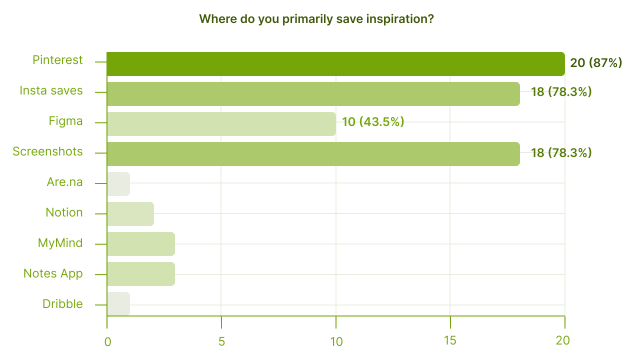

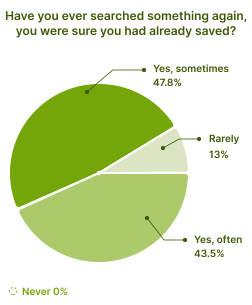
From survey I observed that designers:
60%
actively collect inspiration everyday
52%
rely on folders and boards to stay organized
91%
have searched inspiration again they had already saved
3+
platforms are used on average to save inspiration
"I know I've saved it somewhere, I just can't find it when I need it."
— Designers (Survey Responses)
Saved inspiration on its own isn't enough to rely on, and the survey didn't say why designers search the internet again when they usually find their saves. I went into the interviews with three hypotheses:
external search feels faster
saved inspiration feels outdated or too specific
browsing sparks new ideas
Interview insights
Two ways of saving
Passive, while scrolling on X or Instagram. Active, while searching on Pinterest or Google.
Organising gets skipped
Inspirations are saved into folders or tagged with keywords, but only if the designer takes the time.
Finding inspiration depends on memory
Designers get back to it by remembering who posted it, a colour, a keyword, or which folder it's in.
They search the internet again when
they don't find the saved inspirations fast or need something more specific or fresher.
What it means
Finding a save again depends on what the designer recalls about it and where it was saved. And a single save is rarely enough on its own, so they end up searching for something fresher.
I mapped how other tools handle it
I mapped six tools: Muzli, Cosmos, MyMind, Are.na, Pinterest, and Eagle across saving, organisation, retrieval, and discovery, as a feature matrix and a positioning map.

What stood out
Designers have to go to a specific tools to find inspiration or their saves, whether it's a save-manager like MyMind or Eagle, or an inspiration platform like Cosmos or Pinterest.




The gap
Every tool needs the designer to type or upload something to search. MyMind comes closest, even though it doesn't require any folder organisation, but the query is still manual, and it only searches its own library. If the save isn't present in the saved library, the designer heads to the internet.
All of it pointed to one real problem
By this point the research had turned up a long list of problems. Most of them were versions of the same thing, so I laid them all out to see which one the rest were really pointing at.

A view of how the problem narrowed through each research step, ending in the redefined problem.
How might we bring inspiration back to designers with their design context, while they work, so they don't have to search for it?
Want to see the solution first?
So I defined who I was solving for
Building for designers who are in either of these two moments:
Starting or shaping a design
Laying out a screen, needing to see how others have handled a similar layout, component, or feel.
Comparing or exploring variations
Knowing what to build, but wanting a few reference points before committing.

A designer working
And what the solution had to do
Bring saves back in context
Surface the right saves based on what the designer is working on.
Not depend on memory
No need to recall the platform, folder, or keyword a save was filed under.
Show up at the moment of need
When a designer is designing, that's when the inspiration should surface.
Bring fresh results too
One save is rarely enough. The right inspiration is often a mix of what's already saved and something new.
Then I explored directions
While understanding the problem in depth, I sometimes jumped ahead to a solution, which slowed the work down. I learned this the hard way to understand the problem and dig deeper before any ideation.


The pivot
Instead of building for one tool, build for the canvas moment itself. Nodes is a desktop app that runs alongside any design tool, reads the canvas in progress, and surfaces relevant saves.
The solution simulator
A live simulator of the flow, showing how a designer moves from a canvas to a save on the canvas. The visuals are still WIP.

Please open the simulator in desktop for best experience.
I designed retrieval around the work itself

The canvas becomes the query
Solves for problem:
Retrieval depends on remembering where the saved inspiration was saved, in which folder or collection.
The designer selects a frame in Figma, and that frame itself becomes the input. Nodes reads what's on the frame: layout, type, colour, structure and uses it to look for relevant inspiration.

Confirming what the tool understood
Solves for problem:
A canvas read is a guess, and designers won't trust results they can't check.
Nodes shows what it interpreted from the frame before showing results. The designer confirms or edits it. Results then come from personal saves, preferred sources, and the wider web.

Making inspiration available
Solves for problem:
Even after finding a reference, designers had to download it or drop it in manually.
Inspiration returned by Nodes can be dragged directly onto the Figma canvas, staying in the same window as the work.
And I gave saving a single, clean home

One account, saves everywhere
Solves for problem:
Saves scattered across 3+ platforms means the designer's library is fragmented from day one.
The extension lets designers capture either a specific section or the full page, so a save is scoped to what caught their eye. Meta data (website information, snapshot of inspiration, etc) is also saved to help re-trace it if required.

No accidental duplicates
Solves for problem:
Designers save impulsively across platforms and often re-save the same thing without realising, cluttering their library over time.
Nodes check each new save against what's already in the library. When a duplicate is detected, Nodes automatically add additional metadata to it. The library stays clean, and the extra context makes retrieval better later.
Where I'd take it next
The current design is built for Figma. The same idea could work in Framer, Webflow, Photoshop, or Illustrator, since they all have a canvas.
Since design is done, the next steps would be to test it and check the technical feasibility, whether reading what's on the canvas and matching it to saves is actually buildable at the quality it needs.
My learnings
Don't fall in love with the problem statement
Mine changed a few times through the project, and each time it did, the direction I was heading in stopped making sense. Letting it change is what got the product to where it is.
Don't jump to solutions
I kept wanting to design something before the problem was clear, and every time I did, I ended up redoing that work later. Sitting longer with the question is where the better answer was.
Focus on the current step, not the next one
While researching, I kept jumping ahead to what the solution could look like, which slowed down the research itself. Better to finish one step properly than half-do two.






Checkpoint Reached
Let’s build something meaningful!
© Janvi Guliyan 2026
Made with love